Integrating Decorative Floral Borders into Professional Design Workflows
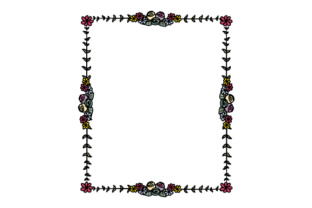
A decorative floral border serves as more than mere ornamentation in professional design; it functions as a structural element that defines space, guides viewer attention, and establishes visual tone. For creators, marketers, and small business owners, understanding how to implement these assets effectively requires moving beyond simple decoration to strategic integration. When you receive this design in SVG, Transparent PNG, EPS, and DXF formats, you are acquiring a versatile toolkit capable of bridging digital branding, print production, and physical fabrication. The value lies not just in the aesthetic appeal of the floral motif, but in the technical flexibility that allows the asset to adapt across different stages of a project lifecycle.
Strategic Application Across Project Phases
The utility of a decorative floral border shifts depending on where it is introduced in the creative or business process. Treating the border as a dynamic component rather than a static afterthought ensures consistency and maximizes return on investment for the asset.
Pre-Production and Brand Planning
Before a single pixel is placed or a machine is calibrated, the decorative floral border should be evaluated against brand guidelines and project specifications. During the planning phase, determine the border’s role within the visual hierarchy. Is it intended to frame content, separate distinct sections, or serve as a background texture? This decision dictates which file format will be primary. For example, if the border is meant to anchor a wedding invitation suite or luxury packaging, the vector-based EPS or SVG files become central to the workflow because they allow for color matching and scaling without quality loss. Conversely, if the immediate need is a quick mockup for client approval or social media teasing, the Transparent PNG offers speed and ease of use in raster-based environments like Canva or Photoshop.
Active Design and Digital Execution
During the execution phase, interoperability is key. A common bottleneck in creative workflows is asset incompatibility. Because this decorative floral border package includes multiple industry-standard formats, it integrates smoothly into diverse software ecosystems. Vector artists working in Adobe Illustrator or Affinity Designer can manipulate individual nodes of the SVG or EPS files to adjust the density of the foliage or alter the curvature to fit non-standard dimensions. This editability is crucial for custom projects where off-the-shelf proportions rarely match specific canvas sizes.
For web designers and digital marketers, the SVG format provides significant performance advantages. Unlike raster images that degrade on high-resolution displays or bloat file sizes when scaled up, SVGs remain crisp at any zoom level while maintaining a lightweight footprint. Implementing the decorative floral border as an inline SVG or CSS background allows for interactive possibilities, such as color transitions on hover or responsive resizing based on viewport width. This transforms a static graphic into a functional UI element that enhances user experience without compromising load times.
Post-Design and Physical Fabrication
The workflow extends beyond the screen when physical products are involved. The inclusion of a DXF file specifically addresses the needs of makers, manufacturers, and vendors who utilize CNC routers, laser cutters, or vinyl plotters. In this context, the decorative floral border transitions from a visual overlay to a cutting path. Before sending the DXF file to production machinery, it must be audited for manufacturing viability. Ensure all paths are closed, overlapping lines are removed, and text elements are converted to outlines. This preparation step prevents machine errors and material waste, demonstrating how digital asset management directly impacts operational efficiency and cost control.
Technical Specifications and Format Utility
Understanding the specific strengths of each included format prevents workflow friction. Each file type solves a distinct set of problems encountered by professionals across different disciplines.
- SVG (Scalable Vector Graphics): The optimal choice for web development, app interfaces, and responsive digital design. It supports transparency, animation, and infinite scaling. Use this when the decorative floral border needs to adapt to varying screen sizes or when file size optimization is a priority for SEO and performance.
- Transparent PNG: Essential for rapid prototyping, presentation decks, and users operating within non-vector environments. While not scalable without quality loss, it offers immediate plug-and-play functionality for educators, bloggers, and administrative staff who need to enhance documents or slides without learning complex vector software.
- EPS (Encapsulated PostScript): The industry standard for professional print production and high-end branding. This format preserves vector data in a way that is universally compatible with older and newer design software alike. It is the safest bet for sending files to commercial printers, sign shops, or third-party vendors who may use legacy systems.
- DXF (Drawing Exchange Format): Specialized for CAD and CAM applications. This format strips away visual styling to focus purely on geometry, making it readable by laser cutters, embroidery machines, and architectural software. It enables the decorative floral border to be physically realized in wood, acrylic, fabric, or metal.
Workflow Integration and Compatibility
Successful integration requires aligning the asset with existing tools and team capabilities. For freelance designers managing multiple clients, organizing these assets within a standardized library system saves hours of search time. Tagging the decorative floral border with metadata—including style keywords, format types, and licensing terms—ensures that team members can locate and deploy the correct version instantly. This organizational discipline scales as businesses grow and asset libraries expand.
Compatibility also extends to collaboration. When working with external stakeholders who may lack specialized design software, providing the Transparent PNG version facilitates feedback loops. Clients can visualize the concept without needing to open vector files, reducing communication barriers. Meanwhile, the production team retains access to the source SVG or EPS files for final output. This dual-track approach keeps projects moving forward efficiently, allowing creative and administrative tasks to proceed in parallel rather than sequentially.
Quality Control and Best Practices
Maintaining quality across different outputs demands vigilance. A decorative floral border that looks stunning on a retina display may fail in print if color profiles are mismatched or resolution is insufficient. Always verify color modes before deployment: use RGB for digital screens and CMYK for print. Since SVG and EPS files are often created in RGB, converting them to CMYK prior to printing prevents unexpected color shifts, particularly with vibrant floral hues that fall outside the printable gamut.
For physical fabrication using the DXF file, conduct test cuts on scrap material before committing to final production. Variations in machine calibration, blade sharpness, or laser power can affect how intricate floral details translate from digital to physical. Simplifying overly complex nodes in the vector file may be necessary to ensure clean cuts and reduce processing time. This iterative testing phase is not wasted effort; it is a critical quality assurance step that protects margins and maintains professional standards.
In digital contexts, accessibility should not be overlooked. When implementing the decorative floral border on websites or in digital documents, ensure it does not interfere with text readability or navigation. If the border is purely ornamental, mark it as decorative in the code so screen readers skip it, preventing confusion for visually impaired users. If it contains meaningful information or serves as a link, provide appropriate alternative text. Balancing aesthetics with usability demonstrates a mature, user-centered design approach that resonates with modern audiences and adheres to web standards.
Long-Term Asset Management and Versatility
The true ROI of a multi-format decorative floral border emerges over time through reuse and adaptation. Rather than treating the asset as single-use, consider how it can be modularized. Sections of the border can be extracted to create standalone icons, watermarks, or social media stickers. The vector nature of the SVG and EPS files makes this subdivision trivial, allowing one purchase to generate dozens of derivative assets. This modularity supports consistent branding across touchpoints while reducing the need for additional purchases.
Furthermore, maintaining master files in editable vector formats future-proofs your investment. As brand colors evolve or design trends shift, the original decorative floral border can be updated without starting from scratch. This adaptability is particularly valuable for seasonal businesses or brands that undergo periodic refreshes. By keeping the source files organized and accessible, teams can quickly modify the asset to suit new campaigns, holidays, or product lines, ensuring the design remains relevant and effective for years to come.
Ultimately, the effectiveness of a decorative floral border depends less on its inherent beauty and more on how thoughtfully it is woven into operational workflows. By leveraging the specific strengths of SVG, PNG, EPS, and DXF formats, professionals can ensure the asset performs reliably across digital, print, and physical domains. This technical fluency, combined with strategic planning and rigorous quality control, transforms a simple graphic element into a powerful tool for communication, branding, and production efficiency.